anyweb
-
Posts
9271 -
Joined
-
Last visited
-
Days Won
371
Everything posted by anyweb
-
as of today, windows-noob.com is on Twitter officially, i've moved the test twitter posts from my twitter account (ncbrady) to it's own dedicated account, please do me and windows-noob.com a favor and follow windowsnoob on twitter all new topics from the RSS feed called todays topics, will be posted there every 15 minutes or so thanks ! cheers niall http://twitter.com/windowsnoob
-

Import Microsoft deployment task sequence Missing
anyweb replied to Slaris's question in Deploy Server 2008
you'll need to download and install mdt 2010 and then do the mdt integration with sccm, it'll become clearer once you install it -
that helps, best way to figure it out is via google and trial and error as the official documentation doesn't seem to always co-relate to real experience oh and after re-reading your original post, you can do alot of those things via Group Policy, cheers niall
-
well i'm not 100% sure, read this and i quote from the technet link in my testing it doesn't autologin, hence the registry hack feel free to find out how to get it to work though i'm as interested as you in this cheers niall
-
the standard build and capture task sequence uses registry 'hooks' to do its hidden magic (auto login and all that), if you can find a way of accessing them to get around this workaround then please share cheers niall
-
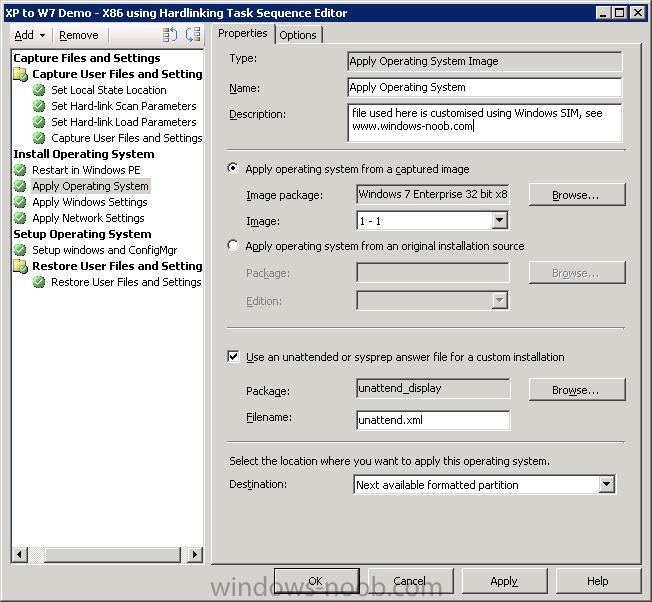
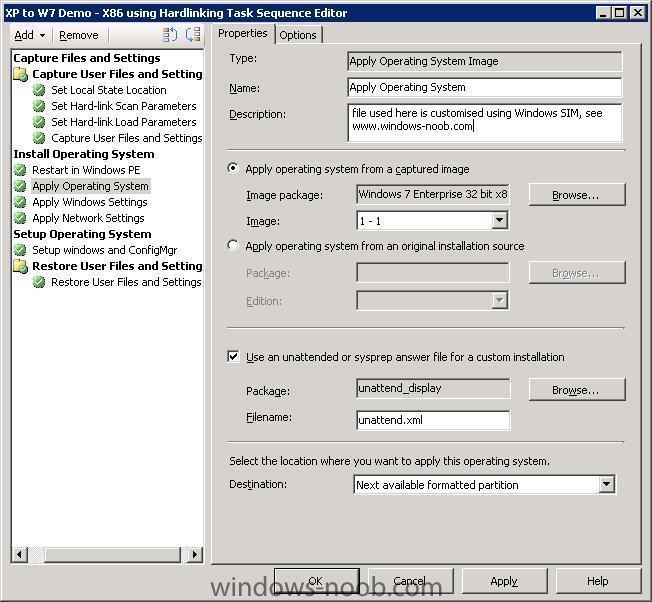
using windows SIM you can customise your unattend.xml file to do most of what you want above in your list read this guide for some pointers then when you have things customised, you'll end up with an unattend.xml file, create a package of that file and add it in the Apply Operating System step in the task sequence, select the Use an unattended or sysprep answer file for a custom installation option
-
as Chiners_68 says you need to enable command line support to find out how to do that, take a look at this list of SCCM guides I have put together, scroll down to troubleshooting.
-
yeah reinstall the SMP, easy to do. also before doing so, browse the smp store folder locally on the server, anything in it ???
-
the question is, how are you deploying windows 7 currently, are you using the install.wim file from the windows 7 DVD or are you installing windows 7 by using an Install Operating System source... *pointing it to the entire content of the dvd source...*
-
most likely its missing network drivers in your boot.wim file the only way to be sure is to read the SMSTS.log file, can you post it here please ?
-
having the client installed is one thing, it's the client agents that matter, they are the enablers: the below info is taken from Brian S Tuckers blog Below is a list of agents, some new and some old which are configurable in SCCM 2007 Beta. I’ll guess that many of these will not change between this version and the final, but wanted to give a heads up on the agents that are configurable. The only thing I’m still a bit confused on is that the first 3 agents are combined into the new Device Client Agent. I’m not sure if the first 3 are going to only be used for SMS 2003 clients and then Device Client Agent only for SCCM clients. I can see that being the configuration, but don’t see it in the documentation so far. More to come on that as I figure it out. Hardware Inventory Client Agent – Once enabled, determines what schedule to perform an inventory of hardware. Includes both hardware and installed software inventory. Default = 7 days Software Inventory Client Agent – Once enabled, inventories all .exe files on a SCCM client computer. Can be configured for alternate file extensions. However, be aware that by adding other file extensions, the SCCM SQL database will increase in size. Advertised Programs Client Agent – Once enabled, tells the SCCM client how often to poll the SCCM server for policy. Agent also allows for visual and or audio notifications. Computer Client Agent (New) – Allows configuration of the Network Access Account which grants access to advertised packages and configures the polling of the client for policy. Allows for custom notification text for Organization Name, Software Updates, Software Distribution and Operating System deployments. Allows for hour and minute mandatory reminders for software distribution. BITS enabled throttling from the SCCM client to the SCCM site server. Desired Configuration Management Client Agent (New) – Specifies that clients will evaluate their compliance with any configuration baseline that is assigned to that system. Also, this agent allows for the schedule of when to check for baseline compliance. When enabled, a new tab in the Systems Management application in the Control Panel will list the baselines. Device Client Agent (New) – Determines the poll interval between the client and the site server for new configuration and software. Agent also allows you to enable software and hardware inventory as well as Software distribution. File collection allows for inventory of specific file extensions similar to Software Inventory above. Remote Tools Client Agent - Enables remote tools to be used with SCCM clients. Allows for configuration of who can use remote tools and notifications on the client systems. Note: As with SMS 2003, remote assistance is the preferred method of connecting to a workstation running Windows 2000 Professional or above. Network Access Protection Client Agent (New) – When enabled, NAP will be applied to the client. SCCM allows you to configure security update policies for systems that are not properly patched. When not properly patched to the baseline, the system will be denied access to network resources. The system will then apply updates and be granted access to the network resource. Although the SCCM client will check for compliance every time the system access the network, policy is only updated once a day by default and can be configured on the Evaluation tab. Software Metering Client Agent – When enabled, will record use of specific applications such as Winword.exe (Word). The default schedule for sending client activity is 7 days. By default, 20 applications are monitored in Computer Management / Software Metering. Software Updates Client Agent (New)- When enabled, allows for software updates on the client and the schedule of how often the client initiate a software update compliance assessment (Default = 1 week). Allows the option to enforce all mandatory deployments as an override to individual advertisements. Deployment Re-Evaluation allows a custom schedule for previously deployed updates that are missing and still required. Software Update Client Agent Let me know if you have questions. Rather than adding pictures for everything, I only added ones that were key points of interest.
-
Office 2k3 Problems
anyweb replied to CPS_TECH_DTAFT's question in Deploy software, applications and drivers
if its not happening in the lab and is happening in production then you need to find out what could be causing it, usually the common suspects are group policies or advertisements that you are not aware of, so have you checked both ? can you zip up the entire ccm/logs folder on a client with the problem and post them here ? -
thanks ! have you checked if antivirus software on the dp is causing a problem ?
-
KB974014 - Windows 7 and 2008 R2 support added for SMS 2003 http://support.microsoft.com/kb/974014 We recognize that Windows 7 is an opportunity for organizations to reduce their costs, improve security, and improve productivity. Windows 7 helps achieve these goals. However, organizations do not maximize the return on investment of Windows 7 without modern infrastructure to support it. We want organizations to benefit from the latest platform's features. To achieve these goals, we want to help organizations migrate to our latest management platform. To do this, we have released a compatibility pack that adds Windows 7 and Windows Server 2008 R2 as supported clients in Microsoft Systems Management Server (SMS) 2003 Service Pack 3 (SP3). This compatibility pack helps SMS 2003 SP3 users migrate their software to Configuration Manager 2007 while realizing immediate benefits from their Windows 7 investment. Note This compatibility pack is a one-time offer. We have no plans to offer future compatibility packs to support future versions of Windows on SMS 2003 SP3. This compatibility pack does not provide support for the administrator console, for any site-server roles, for any SMS 2003 feature pack, or for any SMS 2003 add-in. An example of a feature pack is the Operating System Deployment Feature Pack for Windows 7 or for Windows Server 2008 R2. The SMS 2003 Inventory Tool for Microsoft Updates Revision 3 supports software-update deployments to Windows 7 and to Windows Server 2008 R2. General information about ITMU Revision 3 (http://technet.microsoft.com/en-us/sms/bb676783.aspx) We are releasing this compatibility pack to the general public at no cost. The support life cycle for SMS 2003 ended the Mainstream Support phase on January 12, 2010. SMS 2003 nonsecurity hotfixes that are released after January 12, 2010, follow the Microsoft Lifecycle Support policy and require Extended Hotfix Support. General information about the Extended Hotfix Support program (http://www.microsoft.com/microsoftservices/en/us/support_premier_addons_ehs.aspx) Microsoft has confirmed that this is a problem in the Microsoft products that are listed in the "Applies to" section. To resolve compatibility issues, install this compatibility pack on all site servers that are running SMS 2003 SP3. Compatibility pack information Prerequisites To apply this compatibility pack, your computer must have SMS 2003 SP3 installed. Compatibility issues The following are the compatibility issues that this compatibility pack addresses. Issue 1 The clients that are running Windows Server 2008 R2 or Windows 7 are not listed in the Supported Platforms list for SMS Programs for Software Distribution. Issue 2 The clients that are running Windows Server 2008 R2 or Windows 7 are registered incorrectly when they are discovered by Active Directory System Discovery feature. This issue may affect the Client Push Installation feature or the collections that are created and that rely on the discovery data. How to use the Update.sql file This hotfix contains an Update.sql file. To use the Update.sql file, follow these steps: 1. On the updated SMS site server, stop the following services: * SMS_SITE_COMPONENT_MANAGER * SMS_EXECUTIVE 2. At the SMS site database server, load the following file by using a SQL Server query tool such as Query Analyzer or ISQL/W: <SMS_root>\Logs\<KBID>\Update.sql 3. In the SQL Server query tool, select the Systems Management Server database. 4. Run the script. 5. Restart the following SMS site server services: * SMS_SITE_COMPONENT_MANAGER * SMS_EXECUTIVE File information The English (United States) version of this hotfix installs files that have the attributes that are listed in the following tables. The dates and the times for these files are listed in Coordinated Universal Time (UTC). The dates and the times for these files on your local computer are displayed in your local time together with your current daylight saving time (DST) bias. Additionally, the dates and the times may change when you perform certain operations on the files. Collapse this tableExpand this table File name File version File size Date Time Platform Adsource.dll 2.50.4253.3128 131,072 31-Jul-2007 20:15 x86 Baserc.dll 2.50.4253.3128 61,440 31-Jul-2007 20:15 x86 Update.sql Not Applicable 46,084 31-Jul-2007 20:15 Not Applicable For more information about software update terminology, click the following article number to view the article in the Microsoft Knowledge Base: 824684 (http://support.microsoft.com/kb/824684/ ) Description of the standard terminology that is used to describe Microsoft software updates Back to the top APPLIES TO * Microsoft Systems Management Server 2003 Service Pack 3
-
try accessing the share from the box you are working on, looks like it just cannot connect, check using the NAA (network access account) cheers niall
-
create the package the same way as i do in this example via an Install Software step in the TS.
-
XP install from WDS fails
anyweb replied to beernerd's question in Windows Deployment Services (WDS)
as it's XP, its most likely related to your HAL or storage so checkout the SATA settings in the bios and change them to ATA (compatible) cheers niall -
Installation Forefront Security
anyweb replied to Dom's question in Troubleshooting, Tools, Hints and Tips
could it be this ? Windows Installer Error 1623 This language of this installation package is not supported by your system. -
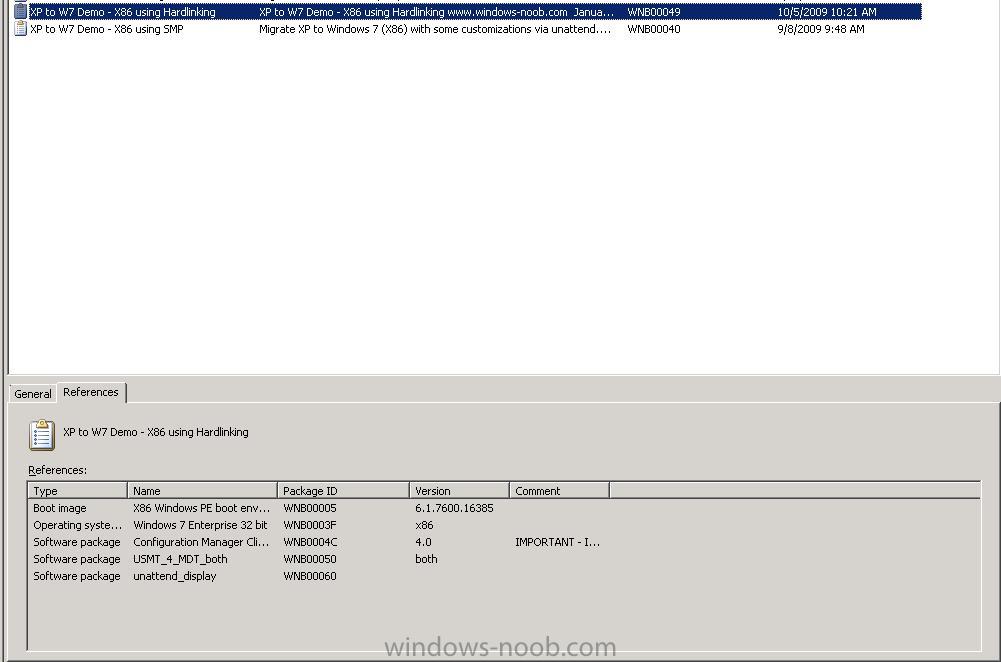
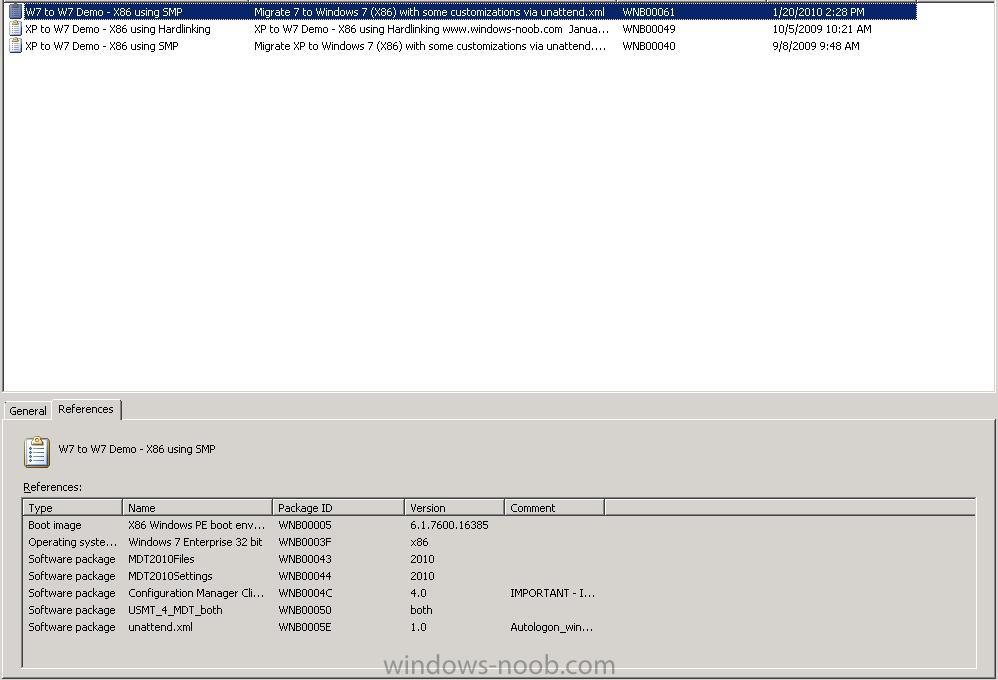
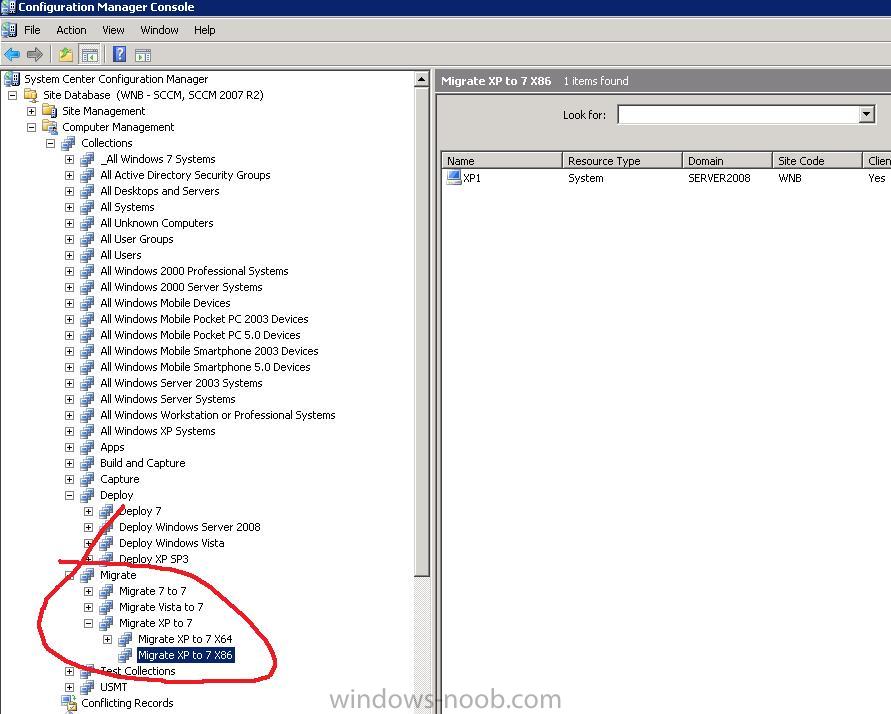
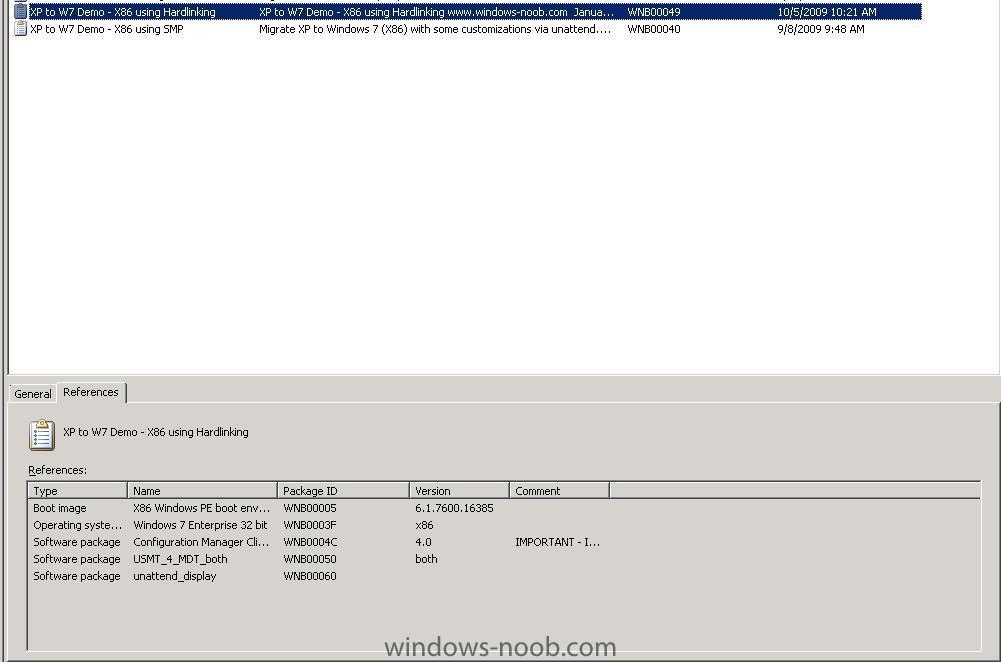
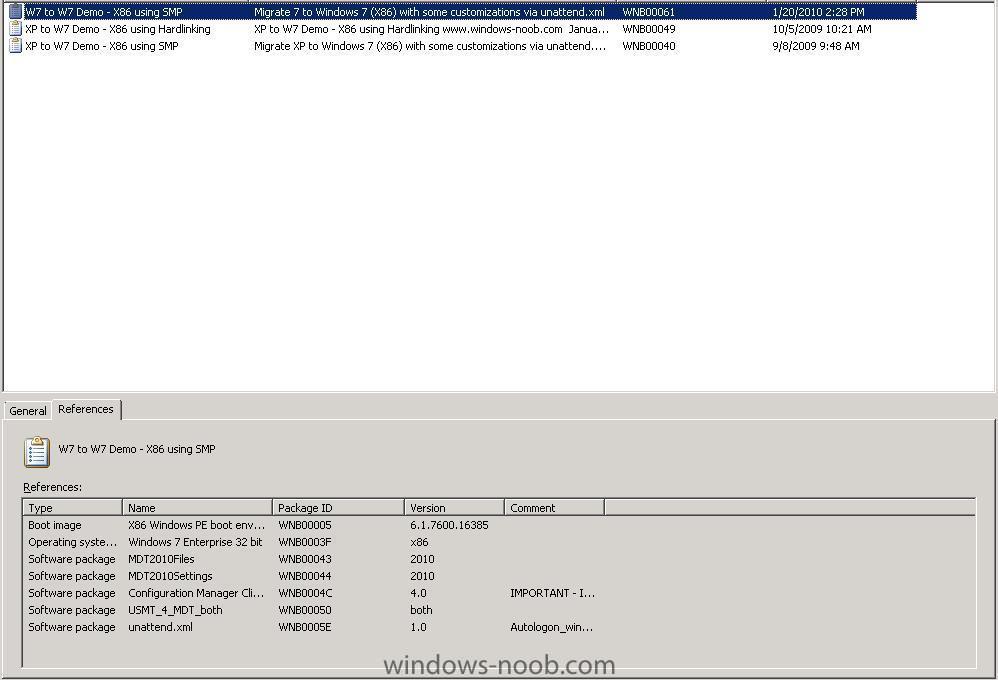
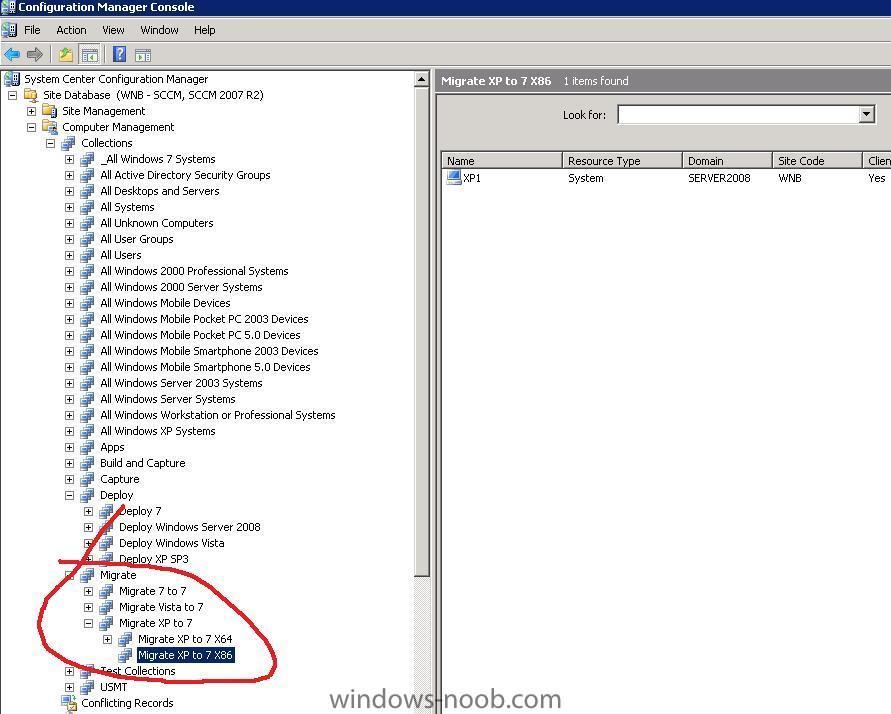
hi all, as this is a common requirement, here are two Task Sequences I use for demoing Windows XP migrations to Windows 7, Related Reading:- OSDMigrateAdditionalCaptureOptions on Technet OSDMigrateAdditionalRestoreOptions on Technet Before you can use these sample task sequences you must have done the following Steps. Using Computer Association add a computer to your Deploy XP collection, and then Deploy Windows XP to that computer. Once Deployed with XP you can use Direct Membership to add that computer to the Migrate XP to 7 Collection described below. XP to Windows 7 Demo - X86 using Hardlinking The first task sequence XP to Windows 7 Demo - X86 using Hardlinking.xml will migrate XP to Windows 7 using hardlinking XP to Windows 7 Demo - X86 using Hardlinking.xml XP to Windows 7 Demo - X86 using SMP The second one uses a SMP *State Migration Point* XP to W7 Demo - X86 using SMP.xml simply import these task sequences into ConfigMgr, and replace the missing package references (configmgr X86 boot images, microsoft deployment 2010 settings, mdt2010 files, windows 7 autologin enable package, usmt4 package and the Windows 7 X86 WIM file itself). See below screenshots to help you with that Task Sequence References with hardlinking Task Sequence References with SMP and then advertise the task sequences to a migrate XP to Windows 7 collection add computers to the Migrate XP to Windows 7 collection and kick off the appropriate TS via RAP.
-
because it cant find the script to run, create it as a package instead, with a program. and the program shall be the vbs script or cmd file
-
did you update collection membership and press F5 to refresh ?
-
i'm lost at your description of the problem, so let's simplify it Dom. are you saying that your TS is failing the three tasks ? if so, which of the three is it failing on ? why do you have a boot image attached to this TS, why is there a reboot ?
-
Setting computername during deployment
anyweb replied to anyweb's question in Troubleshooting, Tools, Hints and Tips
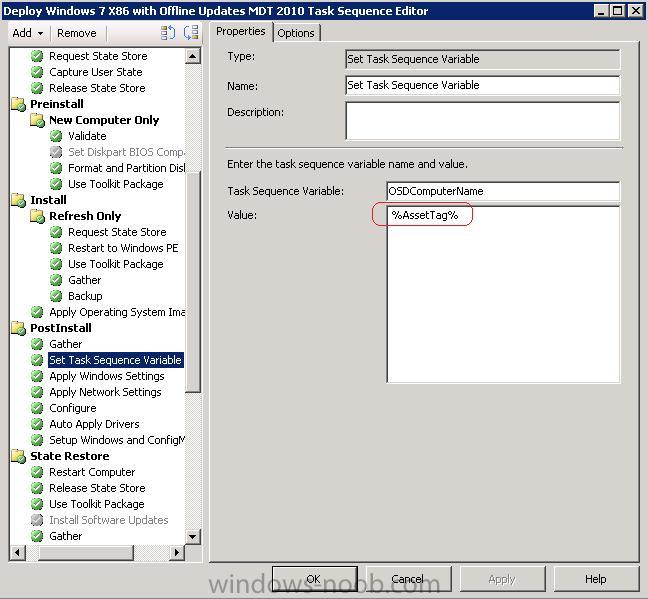
did you Add a "Set Task Sequence Variable" to the postinstall phase before the "Apply Windows Settings" step ? see the following screenshot, however in this screenshot i'm making the computername=the Asset Tag of the computer all you have to do is to leave the assettag value empty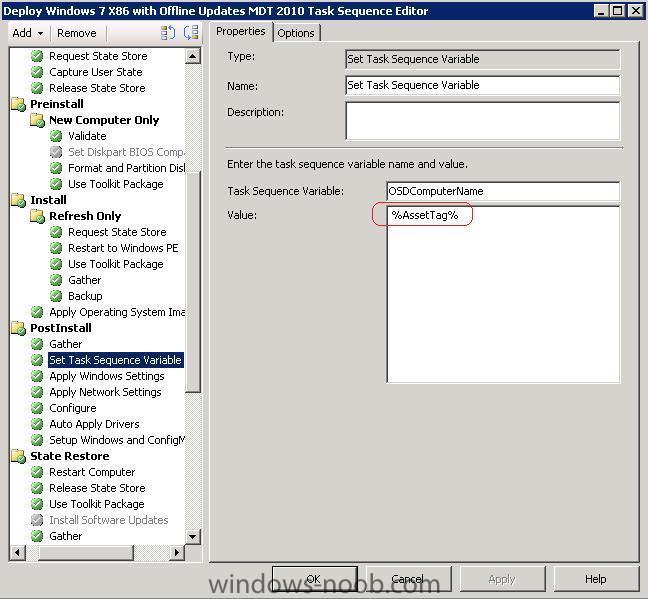
-
Office 2k3 Problems
anyweb replied to CPS_TECH_DTAFT's question in Deploy software, applications and drivers
maybe office 2007 is being installed to a collection you are in ? -
yes this still on target however i'm lacking two things at this point: 1. some software for making Webcasts, any recommendations ? 2. time do do the webcasts cheers niall