anyweb
-
Posts
9253 -
Joined
-
Last visited
-
Days Won
369
Everything posted by anyweb
-
It’s just a given that no matter how stable and reliable a platform is, at some point, it’s going to break. Software, being created and managed by us error prone humans, will at some point in time malfunction and require someone to fix it. This is true of most software, even virtualization software like Hyper-V. The problem with virtualization platforms is that they are inherently complex due to all the different components and are arguably one of the most important aspects of your infrastructure. So, when an issue occurs that requires troubleshooting, it’s no surprise that this causes panic and concern in many administrators. Fear not though! While Hyper-V may seem difficult to troubleshoot and fix due to its complexity there are a number of troubleshooting best practices and tools that can be used to help you with the job. Additionally, there are a number of common issues in the industry that can be easily avoided or resolved, it just takes a little knowledge and training. Altaro Software is hosting another Hyper-V webinar hosted by Microsoft Cloud & Datacenter Management MVPs Andy Syrewicze and Didier Van Hoye. Throughout this webinar, Andy and Didier will be covering a number of best practices and tools that can be used to make troubleshooting easier for those unexpected issues. Additionally, a number of common pitfalls will be discussed along with the needed steps to avoid them before problems occur. Finally, Didier and Andy will discuss some tales from the trenches. These are situations, some common and others uncommon, that Andy and Didier have come across working with Hyper-V over the last several years, and what they did to resolve the issues. Remember, it’s one thing to setup and run a virtualization solution. It’s another to fix it when it’s broken. We hope to see you there! Sign up here
-
 ok please explain where the task sequence is failing for you during deploying Windows 7 x86 (what step/.)
 -
i'll move your post to a new thread and reply there.
-
ok and is that step Options tab set to 'continue on error' ?
-
Custom HTA, list Task Sequence by criteria/query
anyweb replied to baatch's question in Deploying Operating Systems
you could use hidden task sequences and make the deployment id available to specific areas, much like I do with devel mode as explained here. -
why are you installing windows 7 this guide is for windows 10, and what is this step supposed to install ? it's the one that fails <![LOG[Failed to run the action: Install Software. Unspecified error (Error: 80004005; Source: Windows)]LOG]!><time="12:29:09.005-120" date="02-04-2016" component="TSManager" context="" type="3" thread="1760" file="instruction.cxx:911"> <![LOG[MP server http://sccm.JPMC.COM. Ports 80,443. CRL=false.]LOG]!><time="12:29:09.005-120" date="02-04-2016" component="TSManager" context="" type="1" thread="1760" file="utils.cpp:6075"> <![LOG
-
can you post your logs
-
Site System Design Verification - Am I Crazy?
anyweb replied to BzowK's topic in Configuration Manager 2012
you can also prestage the content and send a hard disc (usb or whatever) by traditional methods to stage the content on your remote dp's, just a thought. -
reference image - Windows 7 x64
anyweb replied to ZeZe's topic in System Center Configuration Manager (Current Branch)
ah I forgot you are using CM1511 ? that's a bug.... as explained here -
this should give you some ideas CM12 in a lab - Part 16. Integrating MDT 2013 with Configuration Manager 2012 CM12 in a lab - Part 17. Using MDT 2013 with Configuration Manager 2012 CM12 in a lab - Part 18. Deploying a UDI Client Task Sequence
-
WDS 2012 won't initiate Windows 7 setup with UEFI PXE boot
anyweb replied to marc.l's question in Windows Deployment Services (WDS)
UEFI network boot does not like any DHCP scope options at all, use IP Helpers for that instead. any reason you are not using MDT for this ? -
reference image - Windows 7 x64
anyweb replied to ZeZe's topic in System Center Configuration Manager (Current Branch)
have you checked your boundaries ? -
those are the wrong logs, we need to see the SMSTS*.log files (which are what is generated during OSD)
-
"i tried already existing OSD and new ones but all fails" can you expand on this, what does it mean exactly, and be precise
-
well done Garth !
-
having the database remote only opens you up to more possibilities of failure, (eg: replication), keeping it local minimizes those problems.
-
are any of the users in the Full Adminstrator role ? are you having problems with RBAC ? have you defined any roles ?
-
Microsoft released build 14257 yesterday to Windows Insiders on the fast ring, and here's some info about that more > https://blogs.windows.com/windowsexperience/2016/02/03/announcing-windows-10-insider-preview-build-14257/
-
I would keep sql on the same server as SCCM, having it remote just causes problems.
-
Task sequence fails at Apply Operating System
anyweb replied to afishyfella's topic in Configuration Manager 2012
from the logs <![LOG[CLibSMSMessageWinHttpTransport::Send: URL: SCCM-A-1.bsd.local:80 PROPFIND /SMS_DP_SMSPKG$/BSD0006B]LOG]!><time="16:00:12.891+360" date="02-02-2016" component="ApplyOperatingSystem" context="" type="1" thread="1868" file="libsmsmessaging.cpp:8778"> <![LOG[Error. Status code 404 returned]LOG]!><time="16:00:12.907+360" date="02-02-2016" component="ApplyOperatingSystem" context="" type="0" thread="1868" file="libsmsmessaging.cpp:9141"> <![LOG[dwHttpResultCode >= 200 && dwHttpResultCode <= 299, HRESULT=80190194 (e:\nts_sccm_release\sms\framework\tscore\downloadcontent.cpp,832)]LOG]!><time="16:00:12.907+360" date="02-02-2016" component="ApplyOperatingSystem" context="" type="0" thread="1868" file="downloadcontent.cpp:832"> <![LOG[Http result: 404]LOG]!><time which basically means "not found" so it can't find what it's looking for, are you sure things are distributed to the dp(s) and that you have network at this point / -
sure attach them, but did you launch PowerShell from the ConfigMgr console before doing this ?
-
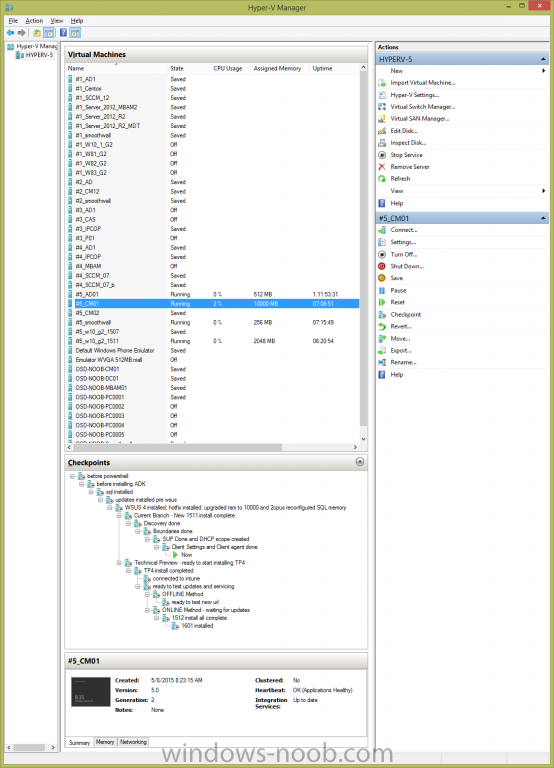
welcome ! 1.What specs do I need for my DNS/DHCP/AD server VM, and can I run all these roles on one vm. you can install them all on one server as I explain in this guide, i do all that on a gen 1 hyperV vm running server 2012r2 with only (gasp) 512mb ram, 127gb hdd. 2.How about the SCCM server? what are the hardware specs. 2cpu's, 10GB ram, 127gb hdd 3.Did you install your SQL on the same vm server as the sccm? and why? What were the specs for your SQL server. absolutely, explained how here 4.The goal is to build a robust SCCM Lab with 5 windows XP, 5 windows 7, 5 Windows 10 at the bottom of my heirachy. 2 Primary servers, 2 secondary servers and a CAS. Even though I mgiht not fully use all of this, I just want to build them in my lab to learn as much as I can, you can let me know if this also advisable or maybe one Primary with several secondaries under them is good. the only thing that's limiting you achieving that goal is hard disc space and RAM as long as the hyperv is a decent i7 CPU or better, i run all my labs on a now aging Dell E6530 with only 16GB ram (it's an i7). The key to the storage is you want fast SSD's otherwise your lab will be a slow and painful experience, try and go for a host with 32GB ram or more if you can and lots of SSD discs ! here's a look at my hyperV host on that laptop
-
take a look at the following link, it references System Center Configuration Manager 2012 but the same rules apply here "For the best performance, place each object on a separate, dedicated RAID volume. For all data volumes (Configuration Manager and its database files), use RAID 10 for the best performance."
-
can you reboot the machine and using a winpe USB key or pxe boot manually open up the unattend.xml file stored on the hard drive and see what's in it ?
-
Manually enable command line support in WinPE image
anyweb replied to dunkel's topic in Configuration Manager 2012
after making the change and 'saving' it you still need to update the boot wim to the dp's otherwise you'll be using the boot image that doesn't have f8 support added.